






Cesantías Withdrawal
Here you will find the steps you need to follow to access the funds in your Cesantías account.

You can process your Cesantías withdrawal through our nationwide service points or through Fondo en Línea and the App.
Note of interest
- Fondo Nacional del Ahorro S. A. does not have payment agreements with 100% digital financial platforms such as NEQUI, Daviplata, and Bancolombia a la mano (10 digits). Therefore, it is important to verify that the account to which the member requests the disbursement does not correspond to these platforms.
- As of July 21, 2025, Fondo Nacional del Ahorro S. A. enabled the digital banks Lulobank, Nubank, and Rappipay.
- In accordance with the nature of the Cesantías withdrawal procedure, special powers of attorney granted are NOT regulated by Decree 806 of 2020. For this reason, it is mandatory to authenticate the signature, fingerprint, and content by both parties; likewise, the authority to receive sums of money must be expressly stated.
- Remember! Cesantías withdrawals through our virtual channels must be authorized by your employer; if they do not authorize you, Fondo Nacional del Ahorro will not be able to disburse the funds.
- Virtual channels are set up to follow an automatic flow; therefore, for Cesantías withdrawals submitted through this channel, if they are not authorized by your employer, Fondo Nacional del Ahorro will not be able to continue with your request.
- If your employer does not approve your request through Fondo en Línea, you must remove this procedure and submit your Cesantías withdrawal through in-person channels with the supporting documents according to the list of documents GCP-ACC-FO-005
- Cesantías withdrawals for education purposes, in accordance with Decree 1562 of 2019, do not require employer authorization. We therefore invite you to submit them through in-person channels (nationwide service points), presenting the supporting documents according to the list of documents GCP-ACC-FO-005.
- To access Fondo en Línea directly:
Steps to follow
through the Fondo en Línea APP
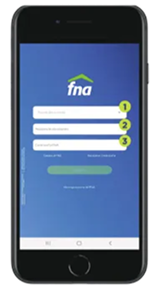
Step 1
- Select ID document type.
- Enter ID document number.
- Enter password.
Click "SIGN IN"
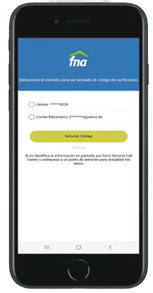
Step 2
- A six-digit code will be sent to the email address or mobile number registered in our system.
- The member must select the method through which they wish to receive the code.
- Important: If the member does not have an email address or mobile number registered in the system, or if this information has changed or does not meet the defined structure, they must first update it at a service point.
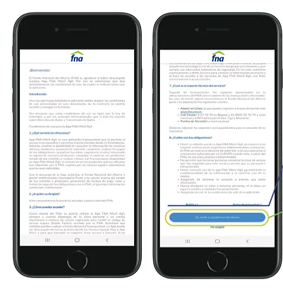
Step 3
Selecting "policy" or "privacy notice" directs the member to the site for review.
The member must accept the terms (this is done only once); otherwise, they will not be able to sign in or use the mobile application.
Cesantías withdrawal
- The employer must have the Cesantías multi-user key assigned.
- The Cesantías account must have an available balance to withdraw.
- Procedures for deceased individuals must be handled through service points.
- The Cesantías must not have any flags, such as: pledges, garnishments, or immobilization.
- There must be no loan procedure in process of approval or legalization.
- There must be no previous unfinished Cesantías withdrawal procedures.
- The maximum amount allowed for withdrawal must not exceed $100,000,000
- The FNA will only disburse to a bank account in the name of the member who owns the Cesantías.

Step 5
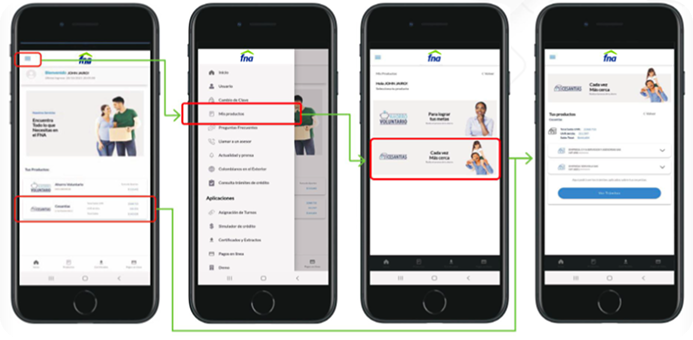
From the main menu, select "My products", then select the "Cesantías" product and finally select the withdrawal option to begin the process.
Step 6
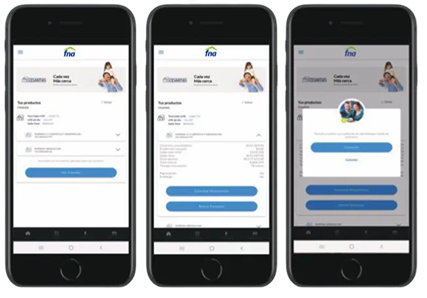
You must select the Cesantías account (company) from which the withdrawal will be made.
As a security measure, the member must complete an identity validation process through Confronta (the tool used to validate user identity), which requires entering the information and correctly answering the questionnaire generated by the system.
Step 7
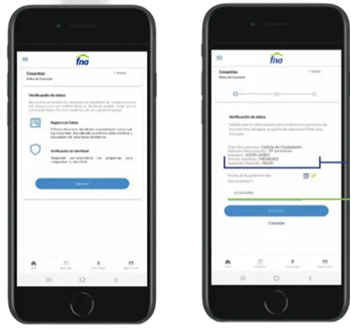
- The steps to follow to validate the member's identity are displayed.
- ID type and number, first name(s), and last name(s) are pre-loaded by the application.
- The document issuance date is the only field the user needs to enter.
Step 8
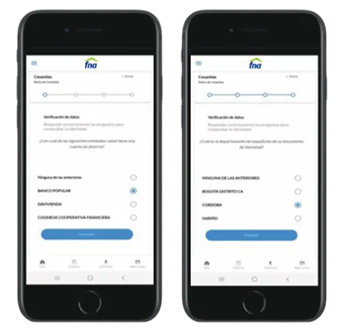
The identity validation questionnaire must be answered correctly. If any answer is incorrect, the withdrawal procedure will not continue.
Step 9
- The available balance and the company's information are displayed.
- Information about the benefits of keeping your Cesantías in the account is displayed.
- Select the type of withdrawal: full or partial.
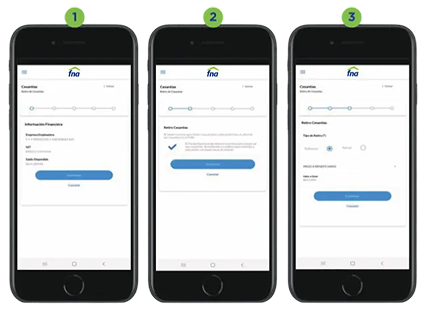
Step 10
- Enter the disbursement information: financial institution, account number and type, city, etc.
- The system asks: are you sure you want to generate the withdrawal request?
- Once "continue" is selected in the previous step, the request is successfully submitted, also showing the procedure number.
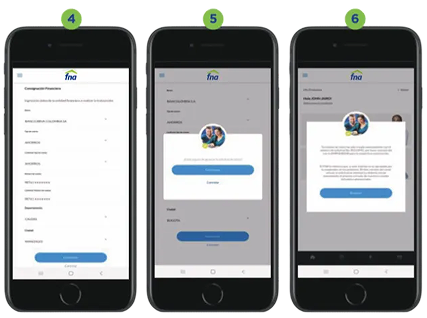
Step 11
Once the procedure is submitted, emails are automatically sent to the employer and the member with information about the request.
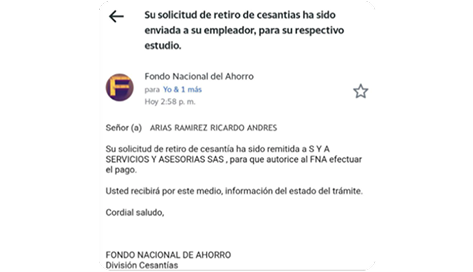
Remember
For withdrawals made through Fondo en Línea (FEL), the disbursement will only be made to bank accounts in your name.
If you need to receive the funds over the counter, you must visit our nationwide service points. The maximum amount for Cesantías withdrawals through virtual channels corresponds to one integral minimum wage in effect for the current year; for example, in 2025 it is $18,505,000. If the amount exceeds this established limit, the procedure must be submitted at nationwide service points.
Steps to follow at service points

Step 1
Attach the required documentation as applicable to your case.

Step 2
Request the form at the service points or generate it through Fondo en Línea.

Important Notes
Fondo Nacional del Ahorro S.A. will apply authentication mechanisms for withdrawals made through in-person channels and virtual channels such as Fondo en Línea and the APP.
You can track the procedure through:
Service Points Our nationwide .
By phone, dialing 307 7070 in Bogotá or the national toll-free line 01 8000 52 7070.
Aimed at Members.
As a result of this service, you will obtain:
Electronic disbursement to the bank account indicated by the member.
Withdrawal categories


For housing
With part of your Cesantías you can make your dream of living where you've always wanted come true.
Learn more